Page | 032 Troubleshooting
General information
BEMER products are equipped with intelligent electronics. They can therefore automatically detect and display errors. Should an error be displayed or should you suspect malfunc- tion, check the following:
• Is the power supply connected to the outlet correctly (does the power supply have a corresponding control light)? If not, connect the power supply to the outlet.
• Is the power supply connected to the B.BOX correctly? If not, connect the power supply to the B.BOX.
• Are the desired applicator modules properly connected?
• Are all relevant cables and plugs undamaged?
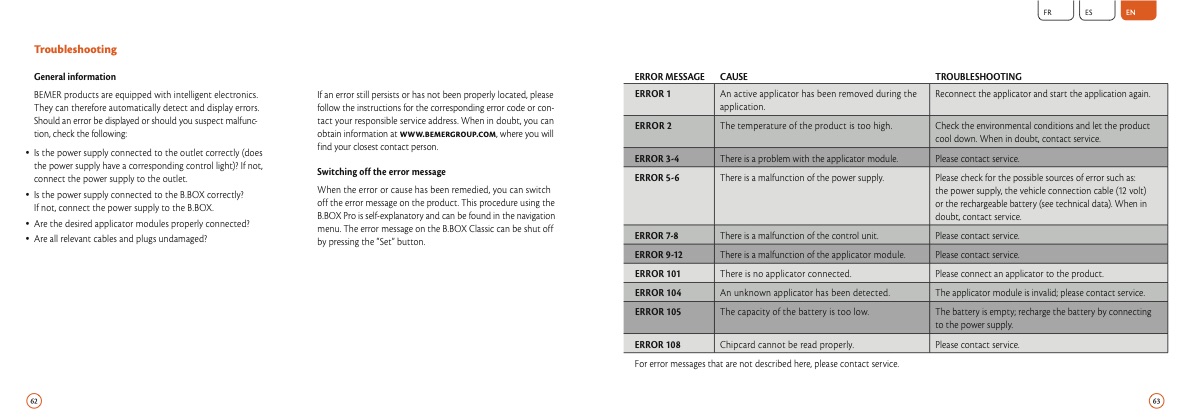
ERROR MESSAGE
CAUSE
TROUBLESHOOTING
fr es en
ERROR 1
An active applicator has been removed during the application.
Reconnect the applicator and start the application again.
ERROR 2
The temperature of the product is too high.
Check the environmental conditions and let the product cool down. When in doubt, contact service.
ERROR 3-4
There is a problem with the applicator module.
Please contact service.
ERROR 5-6
There is a malfunction of the power supply.
Please check for the possible sources of error such as: the power supply, the vehicle connection cable (12 volt) or the rechargeable battery (see technical data). When in doubt, contact service.
ERROR 7-8
There is a malfunction of the control unit.
Please contact service.
ERROR 9-12
There is a malfunction of the applicator module.
Please contact service.
ERROR 101
There is no applicator connected.
Please connect an applicator to the product.
ERROR 104
An unknown applicator has been detected.
The applicator module is invalid; please contact service.
ERROR 105
The capacity of the battery is too low.
The battery is empty; recharge the battery by connecting to the power supply.
ERROR 108
Chipcard cannot be read properly.
Please contact service.
62
63
If an error still persists or has not been properly located, please follow the instructions for the corresponding error code or con- tact your responsible service address. When in doubt, you can obtain information at www.bemergroup.com, where you will find your closest contact person.
Switching off the error message
When the error or cause has been remedied, you can switch off the error message on the product. This procedure using the B.BOX Pro is self-explanatory and can be found in the navigation menu. The error message on the B.BOX Classic can be shut off by pressing the “Set” button.
For error messages that are not described here, please contact service.
|
